More people are become aware of the fact that multi-factor authentication (MFA) is a crucial step in safeguarding your accounts against unauthorized access. While many people still rely on traditional SMS and Voice MFA, these methods have significant vulnerabilities.
In contrast, options like the Microsoft Authenticator app and Passwordless/Passkey authentication offer more secure alternatives.
If you’re responsible for securing user access in a Microsoft environment, choosing the right MFA method matters more than ever.
In this blog, we explore the strengths and weaknesses of these three MFA methods, comparing their security levels, ease of use, and susceptibility to threats to help you make an informed choice for your digital protection.
This comparison focuses on real-world security effectiveness and attack resistance, not pricing or consumer authentication tools.
Traditional SMS and Voice MFA
Traditional SMS or Voice MFA involves sending a one-time code to the user’s phone via SMS or voice call. The user then enters this code to verify their identity. While this method is widely used, it has some security vulnerabilities, such as the risk of SIM swapping or interception of messages.
What do NIST and CISA say about SMS MFA?
Both NIST and CISA have moved away from recommending SMS as a primary second factor. NIST’s Digital Identity Guidelines (SP 800-63B) now classify SMS and other PSTN-delivered codes as a “restricted” authenticator, because the delivery channel can be intercepted or redirected through SIM-swap attacks. CISA goes further in its Implementing Phishing-Resistant MFA guidance, steering organizations toward authenticator apps and, ideally, hardware security keys.
The practical takeaway for a business on Microsoft 365: SMS is a floor, not a target. Microsoft Entra supports number-matching push and passkeys natively, so most teams can move off SMS without buying anything new — they just have to turn it on.
Microsoft Authenticator Application MFA
The Microsoft Authenticator app provides a more secure form of MFA by using push notifications or time-based one-time passwords (TOTPs). Users receive a notification on their mobile device and can approve or deny the sign-in attempt. This method is more secure than SMS/Voice MFA because it is less susceptible to interception and not susceptible to SIM swapping.
Passwordless/Passkey Authentication
Passwordless authentication eliminates the need for passwords altogether. Instead, users authenticate using biometrics (such as fingerprint or facial recognition) or a hardware security key. This method provides the highest level of security as it is resistant to phishing attacks and password theft.
Which MFA method is most secure?
From most to least secure, here’s how the main MFA methods rank:
1. Passkeys and FIDO2 security keys — phishing-resistant by design. The gold standard.
2. Authenticator apps with number matching — strong, and the realistic default for most teams.
3. Biometrics — secure as a device-bound factor, weaker on their own.
4. SMS and voice codes — the weakest option, vulnerable to SIM-swap and phishing. Better than nothing, but on the way out.
Biometric Authentication Methods: What Businesses Need to Know
Biometric authentication verifies identity using physical characteristics — making it harder to steal, intercept, or spoof than SMS codes or passwords.
Unlike SMS-based MFA, biometric methods are phishing-resistant by design and meet current NIST SP 800-63B-4 and CISA guidance for strong authentication.
Types of Biometric Authentication
Fingerprint Recognition. Built into most modern laptops and smartphones. Fast, accurate, no additional hardware needed. Best for: Mobile or hybrid workforces already on modern devices.
Facial Recognition. Windows Hello for Business is the most common enterprise implementation — works natively with Microsoft 365 and Entra ID. Best for: Office-based teams on Windows devices.
Voice Recognition. Less reliable in noisy environments and more susceptible to spoofing. Not recommended as a standalone business authentication method.
How Passwordless Authentication Compares to Other MFA Methods
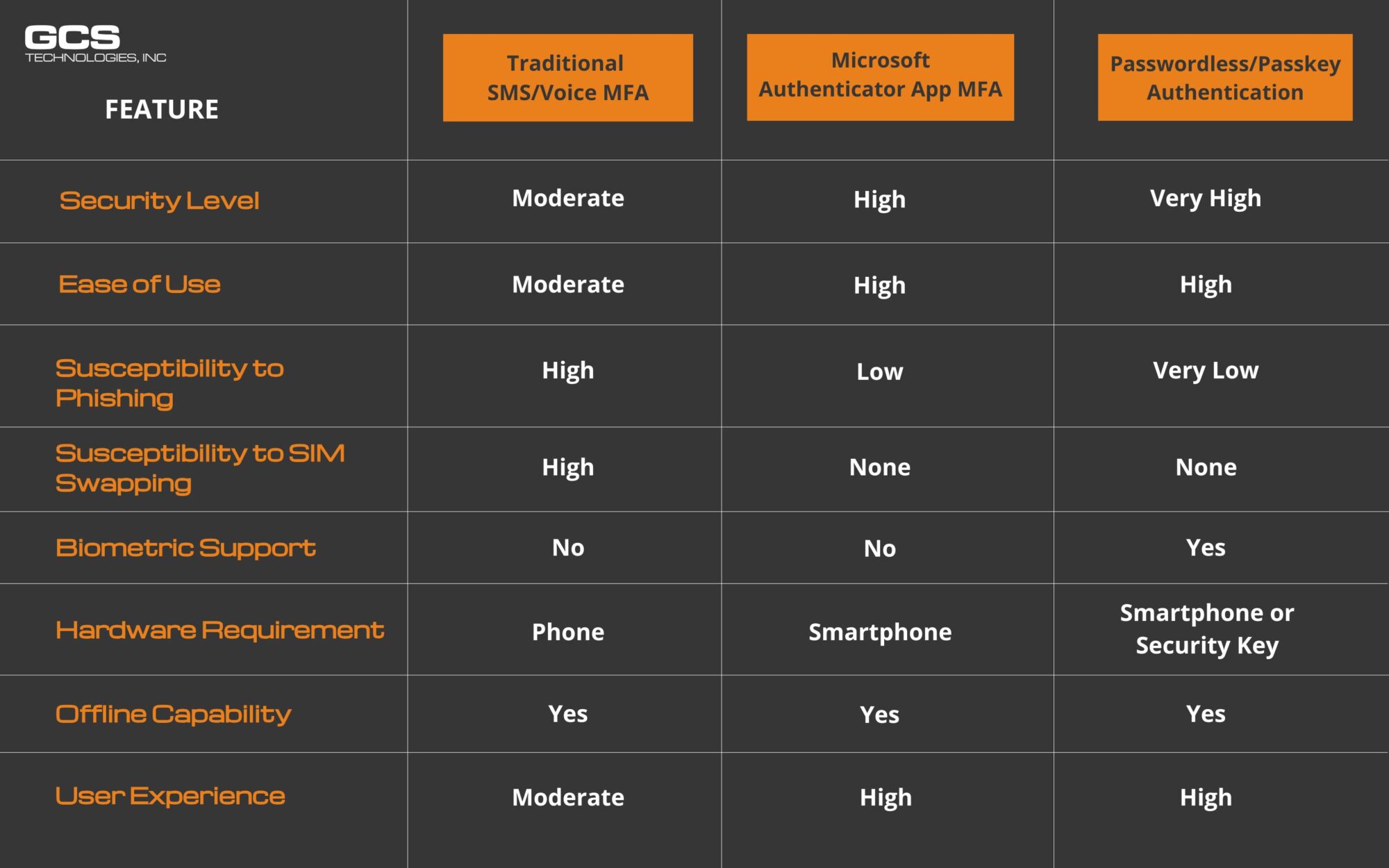
Why Biometrics Is the Strongest MFA Option for Business
- Phishing-resistant — no code to steal, no notification to approve under pressure. See how phishing attacks bypass weaker MFA
- No SIM swap risk — no phone number in the authentication chain
- Biometric data never leaves the device — processed locally per FIDO2 specification, never transmitted over the network
- Meets CISA and NIST phishing-resistant MFA requirements — SMS-based MFA does not
The One Limitation
Biometric authentication is tied to a specific device. If a user loses their laptop or phone, a backup method — such as a FIDO2 hardware security key or recovery code — must be in place.
For organizations running Microsoft 365, Windows Hello for Business with Entra ID handles both biometric login and backup recovery natively — no third-party tools required.
Bottom line: For businesses asking “what is the most secure MFA method?” — biometric authentication combined with FIDO2 is the current gold standard. It eliminates passwords, blocks phishing, and satisfies NIST SP 800-63B-4 requirements for phishing-resistant authenticators.
Not sure which MFA method fits your environment? GCS can assess your current setup and recommend the right path forward.
Each method has its own strengths and weaknesses, but passwordless/passkey authentication offers the highest level of security and user experience. Microsoft’s Authenticator app MFA is also a strong option, providing a good balance between security and ease of use. Traditional SMS/Voice MFA, while still widely used, is less secure and more susceptible to certain types of attacks but still better than no MFA.
Contact GCS for guidance on implementing Microsoft Authenticator or transitioning to Passwordless authentication. Our team will work with you to assess your current security measures and develop a customized strategy that meets your unique needs.
Written by AJ Arjes-Maddox
FAQ: Choosing the Right MFA Method
Is SMS or voice-based MFA still secure enough today?
It’s better than no MFA, but it’s no longer considered strong protection. SMS and voice MFA are vulnerable to SIM swapping, interception, and social engineering attacks.
How is Microsoft Authenticator more secure than SMS MFA?
Microsoft Authenticator uses app-based approvals or time-based one-time passwords, which can’t be intercepted like SMS codes and are not vulnerable to SIM swapping.
What is passwordless or passkey authentication?
Passwordless authentication replaces passwords entirely with biometrics, device-based credentials, or hardware security keys, making it resistant to phishing and credential theft.
Which MFA method offers the highest level of security?
Passwordless/passkey authentication provides the strongest security, followed by app-based MFA like Microsoft Authenticator. SMS and voice MFA are the weakest of the three.
How should organizations transition away from SMS MFA?
Start by enforcing app-based MFA, then gradually roll out passwordless authentication for users and administrators, prioritizing high-risk accounts first.