It seems like every time you turn on the news, there is another headline about AI. And while it can do cool tricks like producing original images or giving recipe recommendations, there have been more important advances in the security space that don’t get as much attention. Over the last few years, Microsoft has made significant progress infusing AI into their existing security tools to make businesses more secure.
Microsoft’s new AI-powered security tools aren’t just about reacting to threats—they’re actually designed to predict and stop attacks before they happen. By analyzing millions of data points across your network, these tools can spot unusual behavior instantly, helping your business take action early and avoid costly damage. In this blog, we’ll dive into how these tools work and explore their key features.
AI-Powered Threat Detection and Response
Microsoft’s new AI-powered security tools are designed to identify threats faster and more accurately than ever before. Unlike traditional security systems that rely heavily on predefined rules, Microsoft’s AI tools use machine learning to analyze vast amounts of data, detect anomalies, and identify potential threats in real time.
For example, if there’s unusual login activity or suspicious file access, the AI instantly flags it, allowing for a rapid response before any significant damage can occur. By continuously learning from patterns and behaviors, these tools become more effective over time, improving your overall security without the need for constant manual intervention.
Attack Path Analysis in Microsoft Defender for Cloud
Microsoft Defender for Cloud is a powerful tool that uses AI-driven attack path analysis to secure cloud environments. This feature helps you visualize potential attack vectors cybercriminals might exploit. It maps out the vulnerabilities in your cloud infrastructure, allowing your security team to identify weak points and take action before a breach occurs.
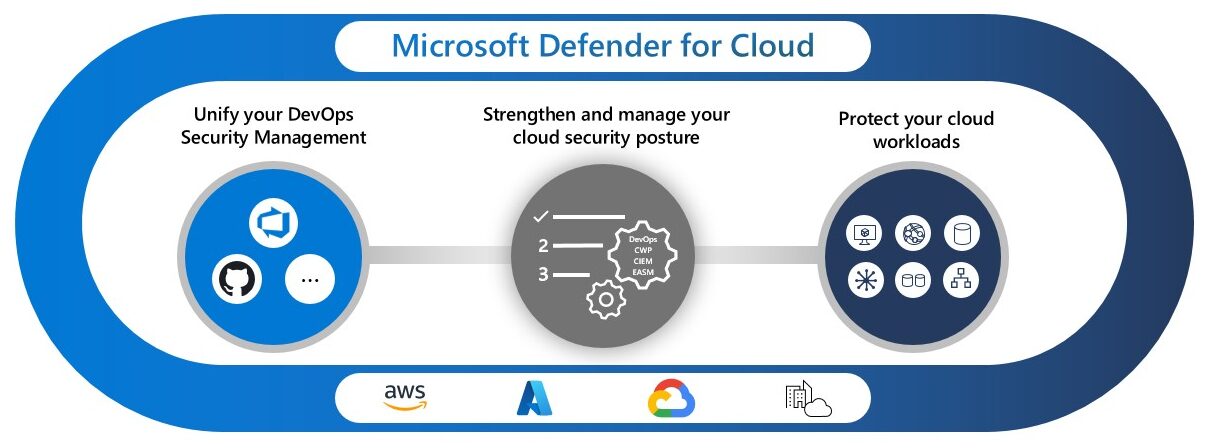
Image source: Microsoft Defender for Cloud, from Microsoft Learn.
Cloud security is critical for modern businesses, and using AI, Defender for Cloud provides a proactive approach to securing your environment. By continuously analyzing cloud activity and potential threats, the tool helps businesses maintain a strong defense without relying on reactive measures alone.
Advanced SIEM with Microsoft Sentinel
Microsoft Sentinel is a cloud-native SIEM (Security Information and Event Management) solution that uses AI to collect, analyze, and respond to security data across your entire infrastructure. A SIEM works by gathering data from various sources—such as cloud platforms, on-premise servers, and applications—and analyzing it to detect unusual patterns or potential threats.
Sentinel works by centralizing all this data, giving you a full view of your system’s security. When threats are identified, it can automatically take action, like isolating compromised devices or notifying your security team. With its customizable detection rules and machine learning models, Sentinel learns and adapts to your business’s unique needs, helping protect against both known and emerging threats in ways that were previously not possible.
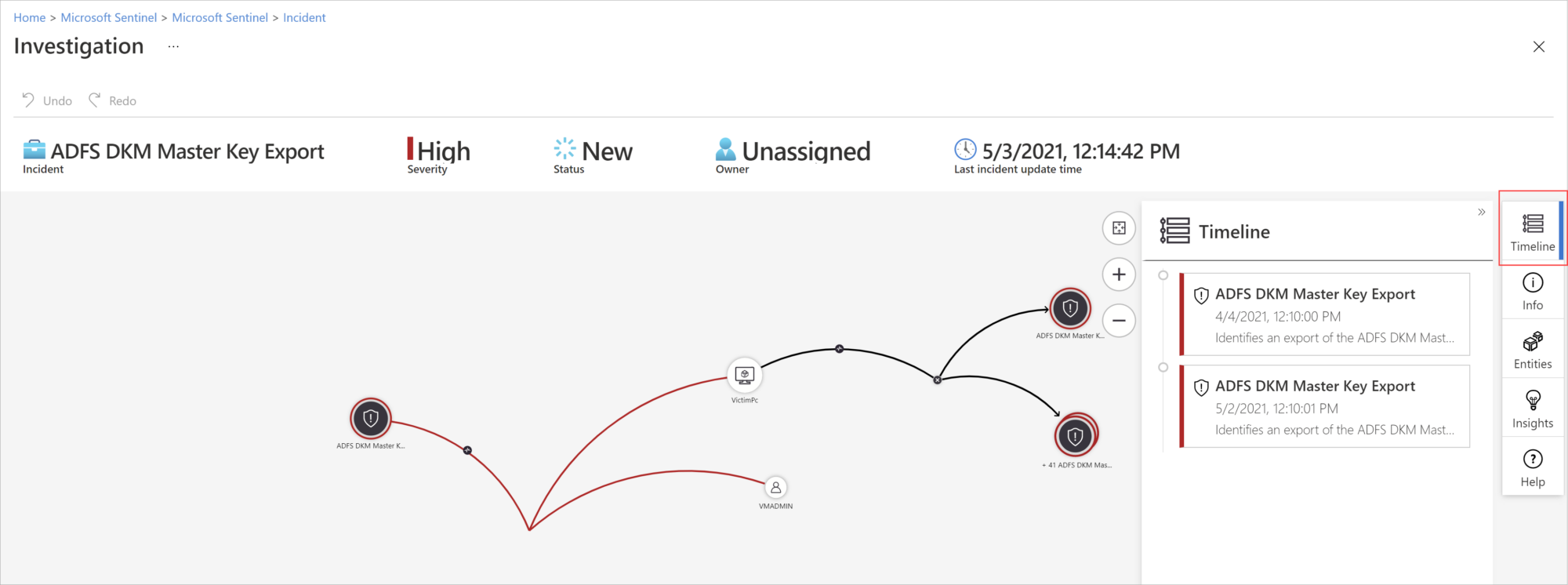
Microsoft Sentinel AI-driven threat investigation. Image source: Microsoft Learn
Microsoft Purview for Data Protection
Microsoft Purview is a data governance product that leverages AI to provide advanced data protection across both structured and unstructured data. Whether it’s documents, emails, or data stored in the cloud, Purview ensures that your sensitive information is monitored and secured at all times.
Using AI, Purview automatically detects unusual access patterns or potential data leaks, sending real-time alerts to your security team. This is especially important for organizations managing large datasets or handling sensitive customer information. Purview’s ability to adapt to emerging threats makes it a critical tool for maintaining data privacy and complying with industry regulations.
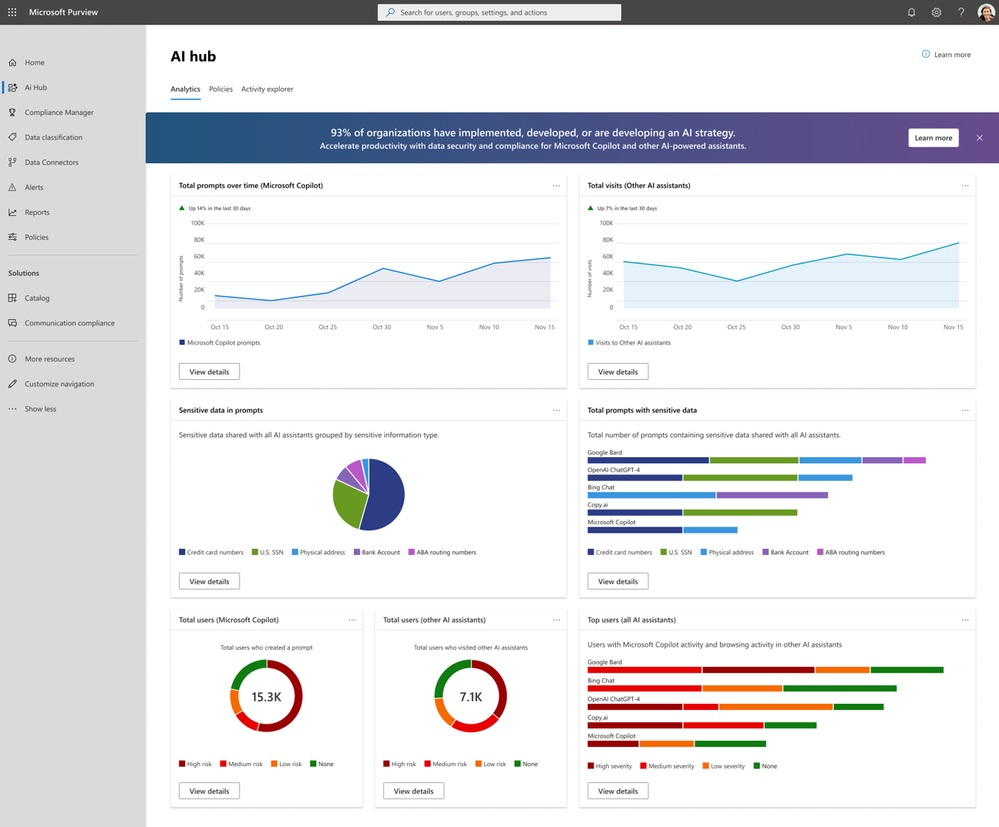
Image source: AI Hub in Microsoft Purview, from Microsoft Tech Community.
Automated Threat Detection Across Platforms
One of the key benefits of Microsoft’s AI-powered security tools is their automation. Once a threat is detected, immediate actions can be triggered without waiting for manual input. For example, phishing emails can be blocked automatically, or compromised devices can be isolated to prevent malware from spreading.
Additionally, these tools are seamlessly integrated with Microsoft 365, providing consistent protection across Teams, SharePoint, and OneDrive. Security is built directly into the workflow, allowing your team to stay protected without interrupting their daily tasks.
How GCS Technologies Can Help You Stay Secure
At GCS, we utilize the full range of Microsoft’s AI-powered security tools to protect your business. By partnering with us, you get access to these cutting-edge technologies along with expert implementation and ongoing support. From cloud security to data protection and threat detection, we ensure your organization is fully secured without the need for dozens of overlapping security solutions.
If you’re ready to enhance your cybersecurity strategy, contact us to learn more about how GCS Technologies can help safeguard your business with Microsoft’s state-of-the-art security tools.