The enterprise cyber-threat landscape is expanding at alarming rates. Global attacks increased by 38% from 2021 to 2022. The global attack volume per organization also increased in 2022, reaching an all-time high of 1168 weekly attacks in Q4.[1]
In this worrying environment, businesses must protect themselves and their assets from cyber dangers by strengthening their cyber defenses. Here’s where modern security products like Windows Defender and Microsoft 365 Defender come in.
A common belief is that these are the same product. This is not true.
Windows Defender vs Microsoft 365 Defender
As this chart illustrates, there are many differences between Windows Defender and Microsoft 365 Defender:
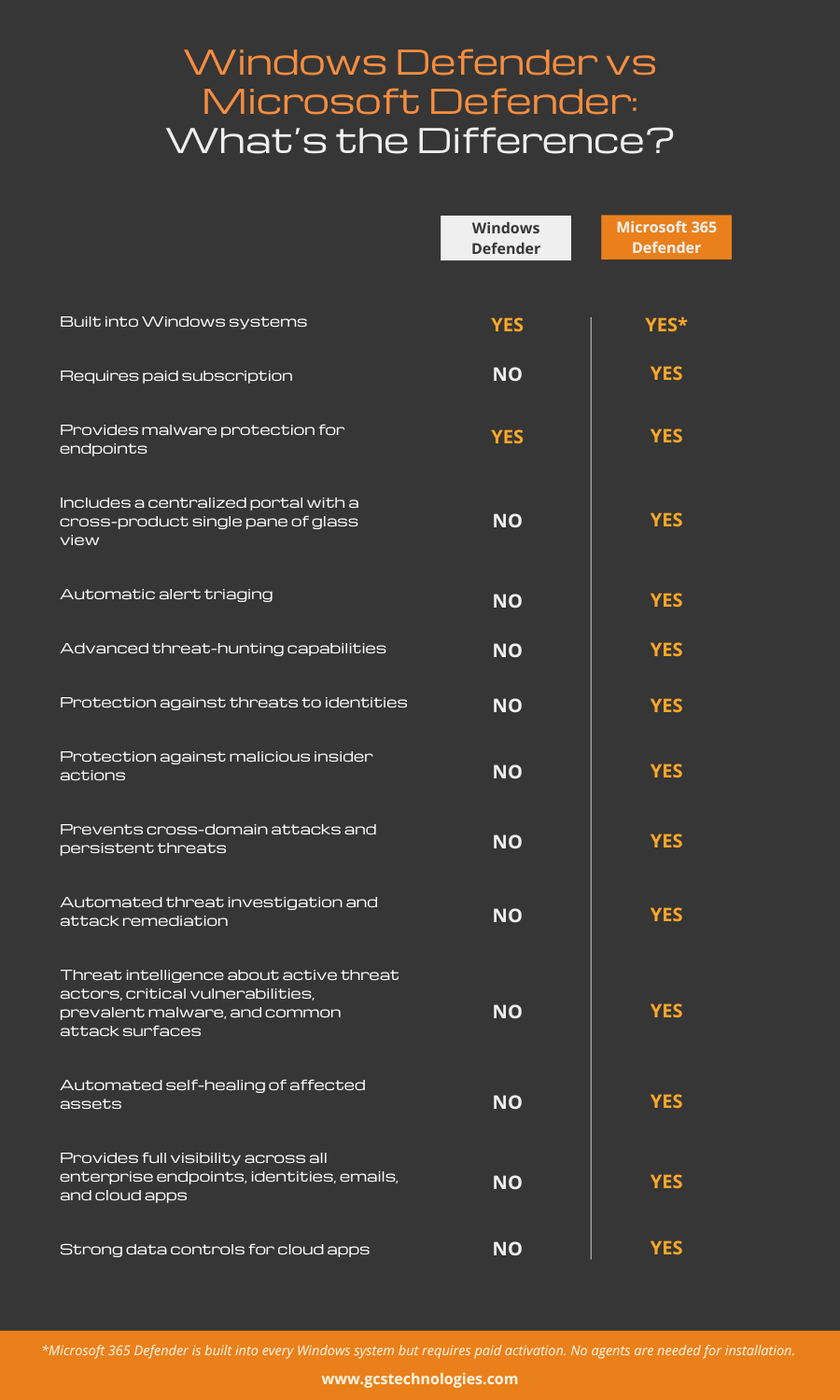
Keep reading for an in-depth comparison of Microsoft Defender vs Windows Defender.
What Is Windows Defender?
Microsoft Defender Antivirus is an antivirus program included in Windows Security, which is built into Windows 10 and 11 operating systems and doesn’t require a separate paid subscription. It is worth noting that Windows Security’s name changed: in earlier versions of Windows 10, Windows Security is called “Windows Defender Security Center” (this article will refer to it as “Windows Defender”).
Windows Defender runs automatically when a Windows system is turned on and can detect, block, and neutralize many kinds of malware.
It can also prevent malicious apps from changing system settings and malicious code from being injected into running RAM. It offers real-time threat protection for apps and websites, includes a built-in firewall and password manager, and provides a good base layer of device security and account protection.
Drawbacks of Windows Defender
Overall, the threat detection and protection capabilities of Windows Defender are less comprehensive than Microsoft 365 Defender. While it can stop many known malicious websites and downloads, it cannot block all suspicious connections, reliably monitor all inbound and outbound traffic, or block advanced exploit attacks.
Another serious downside is that it doesn’t offer protection for non-Microsoft web browsers or products, much less protection for all resources in an enterprise IT environment.
Some of the other weaknesses of Windows Defender are:
- No identity theft protection
- Doesn’t include system performance optimization tools
- Lack of dark web monitoring for emerging threats
- No centralized security management portal
- Clunky interface, for example, the secure firewall requires users to go into multiple menus to make small changes
All in all, Windows Defender provides good malware protection, account protection, and device security. However, it cannot protect enterprise networks and resources from evolving and sophisticated threats. Its lack of user-friendly interfaces and centralized dashboards also limits its usefulness in enterprise settings where more advanced protection is required.
What Is Microsoft 365 Defender?
Microsoft 365 Defender is an extended detection and response (XDR) solution for unified visibility and investigation across the entire cyber kill chain. The solution includes numerous products that provide integrated protection against sophisticated attacks across the entire digital estate of endpoints, identities, emails, and applications.
Microsoft Defender for Endpoint
This security platform can prevent, detect, investigate, and respond to advanced threats on enterprise network endpoints, such as PCs, laptops, routers, and firewalls. It uses the endpoint behavioral sensors embedded in Windows 10, cloud security analytics, and threat intelligence to generate useful insights about security events and attackers.
Microsoft Defender for Office 365
It protects users against threats in email messages, attachments, and links. The product integrates into the Office 365 subscription and includes advanced capabilities for threat investigation, simulation, prevention, and response.
Microsoft Defender for Identity
This cloud-based security solution can identify, detect, and investigate advanced threats, compromised identities, and malicious insider actions across enterprise networks. It also generates insights to reveal potential threats and help reduce the attack surface.
Microsoft Defender for Cloud Apps
This cloud access security broker (CASB) secures access between enterprise users and cloud resources. It can also identify and combat cyber threats across the cloud services used in an organization.
Microsoft Defender Vulnerability Management
Defender Vulnerability Management identifies, assesses, remediates, and tracks vulnerabilities across enterprise IT assets. It also prioritizes vulnerabilities and provides security recommendations to help security teams detect, monitor, and mitigate risk.
Azure Active Directory Identity Protection
Identity Protection automatically detects and remediates identity-based risks, such as leaked credentials, password spray, and anonymous IP address use. It generates signals that can be fed into a security information and event management (SIEM) platform to trigger further investigation and remediation efforts.
Microsoft Purview Data Loss Prevention (DLP)
Purview DLP enables security teams to protect sensitive data and reduce the risk of data breaches in Microsoft 365 services, Office applications, endpoints, and third-party cloud apps.
App Governance
Microsoft Defender provides increased visibility, remediation, and governance into the access and use of sensitive data in Microsoft 365. It also generates alerts when it detects anomalies in-app activity or the use of risky apps.
Microsoft 365 Defender vs. Windows Defender: Major Differences
Windows Defender mainly provides protection against malware, while Microsoft 365 Defender is an XDR solution with advanced threat detection, prevention, investigation, and response capabilities. While Windows Defender is a standalone antivirus product, Microsoft 365 Defender is a unified enterprise defense suite with advanced capabilities:
✔ Prevent cross-domain attacks and eliminate persistent threats
✔ Prioritize incidents in a single dashboard to reduce signal noise and prevent alert fatigue
✔ Automatically triage and respond to critical alerts
✔ Automatically remediate isolated attacks
✔ Auto-heal affected assets
✔ Proactively hunt for threats
Unlike the Microsoft 365 Defender portal, Windows Defender does not include a centralized portal to detect, investigate, and respond to a wide range of threats. Microsoft 365 Defender can also be integrated with SIEM tools to provide unified security and visibility into the entire digital estate.
From a commercial standpoint, Windows Defender is built into Windows, whereas Microsoft 365 Defender must be purchased with a Microsoft 365 subscription.
Windows Defender vs. Microsoft 365 Defender: Which One Is Right for You?
Both Windows Defender and Microsoft 365 Defender offer protection against cyber threats and threat actors. Windows Defender may be sufficient if all you need is real-time and persistent malware protection. However, if you need to protect all your endpoints, identities, cloud apps, email, and documents, then Windows Defender is neither suitable nor sufficient.
Additionally, if you require a centralized dashboard, threat hunting, automated incident response, granular visibility into the threat landscape, etc., Microsoft 365 Defender is the better choice.
Finally, if your threat landscape expands, relying on Windows Defender for protection can put your organization at serious risk. The best way to minimize this risk is to invest in Microsoft 365 Defender.
Make the Most of Microsoft 365 Defender with GCS Technologies
When it comes to advanced and comprehensive cybersecurity, Microsoft 365 Defender outshines Windows Defender. Make the most of this integrated security suite with a knowledgeable partner like GCS Technologies.
With GCS Secure Cloud, we help you configure and customize Microsoft 365 Defender to elevate your security posture and protect business-critical assets from sophisticated attacks and smart attackers.
Contact us for a free consultation with our Microsoft 365 Defender experts.
[1] https://blog.checkpoint.com/2023/01/05/38-increase-in-2022-global-cyberattacks/