Microsoft 365 Copilot can see more of your organization’s data than most admins expect. Two features control what it’s allowed to search: Restricted SharePoint Search (RSS) and SharePoint Advanced Management (SAM). Here’s what each one actually does, and which one your organization needs.
Understanding Restricted SharePoint Search (RSS)
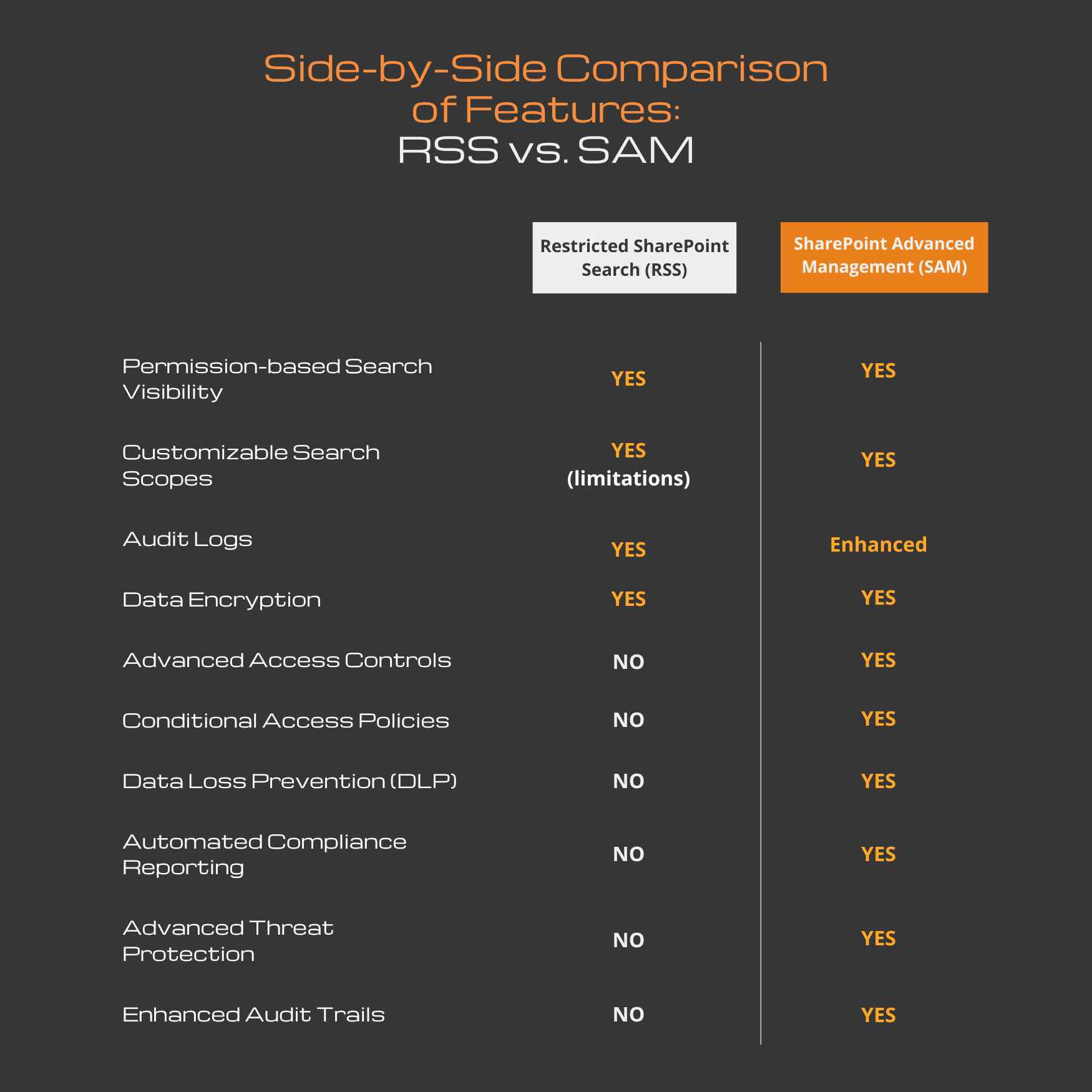
Restricted SharePoint Search (RSS) is designed to enhance data security by limiting search visibility based on user permissions. While designed to be a no-cost, temporary solution, this feature helps ensure that sensitive information is only accessible to authorized personnel. Key features of RSS include:
- Permission-based Search Visibility: RSS restricts search results to documents and data that users have explicit permissions to access, preventing unauthorized access to sensitive information.
- Customizable Search Scopes: Administrators can define specific search scopes to further control what information is searchable, tailoring the search experience to organizational needs.
- Audit Logs: RSS maintains detailed audit logs of search activities, providing visibility into who searched for what and when, helping to detect and investigate potential security incidents.
- Data Encryption: All search queries and results are encrypted, ensuring that data remains secure in transit and at rest.
Exploring SharePoint Advanced Management (SAM)
SharePoint Advanced Management (SAM) offers a more comprehensive suite of data protection controls, extending beyond search functionalities to include advanced management and security features. This is an add-on license that really steps up the security controls surrounding CoPilot content searches. Key features of SAM include:
- Advanced Access Controls: SAM provides granular access controls, allowing administrators to specify detailed permission settings for individual users and groups.
- Conditional Access Policies: SAM supports the implementation of conditional access policies, enabling dynamic security measures based on user behavior and context.
- Data Loss Prevention (DLP): SAM includes built-in DLP capabilities to identify, monitor, and protect sensitive information across SharePoint sites.
- Automated Compliance Reporting: SAM automates compliance reporting, making it easier to meet regulatory requirements and demonstrate adherence to data protection standards.
- Advanced Threat Protection: SAM integrates with advanced threat protection tools to detect and mitigate potential security threats in real-time.
- Enhanced Audit Trails: SAM offers enhanced audit trails, providing a more detailed and comprehensive view of user activities and changes within SharePoint.
Side-by-Side Comparison of Features: RSS vs. SAM
Conclusion
RSS and SAM solve different problems. RSS limits what Copilot can search today, at no additional cost. SAM adds the access controls, DLP, and audit trails most organizations need before expanding Copilot further.
If you’re not sure which one your Microsoft 365 environment actually has configured, that’s worth a conversation.
Talk to GCS about your Copilot data protection setup: https://www.gcstechnologies.com/contact/
FAQ: Copilot for M365 Data Protection (RSS vs. SAM)
What is Restricted SharePoint Search (RSS) and when should it be used?
RSS limits Copilot and search results to content users already have permission to access. It’s a no-cost, temporary control best suited for organizations that need basic guardrails while preparing for a more advanced security model.
What does SharePoint Advanced Management (SAM) add beyond RSS?
SAM provides deeper, long-term controls such as granular access management, conditional access, DLP, enhanced audit logs, and advanced threat protection—making it suitable for organizations with higher security and compliance requirements.
Is RSS enough to secure Copilot for Microsoft 365 long term?
No. RSS helps reduce immediate risk but lacks advanced governance, DLP, and threat protection. It’s a starting point, not a complete Copilot security strategy.
Which organizations should invest in SharePoint Advanced Management (SAM)?
Organizations handling sensitive data, regulated information, or operating in compliance-heavy industries benefit most from SAM’s advanced controls and reporting capabilities.
How should businesses decide between RSS and SAM for Copilot?
Use RSS for short-term risk reduction or early Copilot testing. Choose SAM for long-term Copilot adoption, stronger data governance, and scalable security controls.