An AI readiness assessment is a structured process that prepares your environment — data, access controls, security configurations, and governance policies — for safe and productive AI adoption. It is the first step in AI enablement: making sure the foundation is right before the tools go live.
This guide explains what an AI readiness assessment covers, what AI enablement looks like in practice, and how businesses move from assessment to adoption — based on what we do with SMB environments in Austin, Texas.
What Is an AI Readiness Assessment?
An AI readiness assessment evaluates whether your organization’s data, access controls, security posture, and operational processes are prepared for AI tools like Microsoft Copilot, ChatGPT Enterprise, or other large language models.
It answers a practical question: what needs to be in place before you turn AI on?
For small and mid-sized businesses, an AI readiness assessment is not a maturity model or a theoretical framework. It is a focused review of five areas that directly determine whether AI adoption will be successful: how your data is organized and classified, who has access to what, whether your systems are configured to support AI securely, whether your monitoring can detect AI-related events, and whether your organization has governance policies for how AI gets used.
The goal is not to find problems — it is to clear the path for enablement.
What Is AI Enablement?
AI enablement is the process of turning readiness into adoption. Once the assessment identifies what needs to be addressed, enablement is the work of actually preparing the environment, rolling out AI tools, and establishing the governance structures that keep adoption productive and secure over time.
For most SMBs, AI enablement includes four phases:
- Remediation. Addressing the gaps the assessment surfaced — cleaning up access permissions, classifying data, enforcing MFA consistently, and configuring tenant settings to support AI tools.
- Governance setup. Establishing AI acceptable use policies, defining who owns AI-related decisions, and creating guidelines for how employees interact with AI tools across the organization.
- Controlled rollout. Enabling AI for a defined group of users and use cases first — typically starting with productivity tools like Copilot in Teams, Outlook, and Word — before expanding organization-wide.
- Ongoing management. Monitoring AI usage, reviewing access periodically, updating governance policies as tools evolve, and integrating AI oversight into regular IT operations.
AI enablement is not a one-time project. It is an operational capability that grows alongside your business.
What Does an AI Readiness Assessment Cover?
A thorough AI readiness assessment evaluates five core areas. Each one prepares a different layer of your environment for AI adoption.
1. Data Readiness and Classification
Data readiness for AI is the single most important factor in a successful rollout. Before enabling any AI tool, you need to understand what data exists, where it lives, who can access it, and how it is classified.

In most SMB environments, this is where the work starts. Files are spread across SharePoint, OneDrive, shared mailboxes, and legacy file shares. Permissions are inherited rather than intentional. Sensitive data — financial records, client contracts, HR documents — sits alongside everyday files with no classification or sensitivity labels.
When AI pulls from this environment, it treats everything equally. An employee asking Copilot to summarize recent documents may receive confidential information that was never meant to be broadly accessible.
The enablement step: classify and label sensitive data, organize file structures, and align permissions with current roles — so AI tools work with clean, governed data from day one.
Gartner predicts that organizations will abandon 60% of AI projects not supported by AI-ready data. Getting data readiness right is the highest-leverage step in the entire enablement process.
2. Access Controls and Privilege Management
Over time, access expands. Accounts are created, roles change, exceptions accumulate — but cleanup rarely happens. An AI readiness assessment examines who has access to what, whether MFA is consistently enforced, and whether any accounts or permissions have drifted beyond their intended scope.

Common findings include dormant admin accounts from previous employees or IT providers, inconsistent MFA policies (especially for executives or legacy workflows), and users with elevated permissions that no longer match their role.
In an AI-enabled environment, permissions matter more than ever. AI tools inherit the access level of each user — so overpermissioned accounts do not just create a security gap, they create a data exposure surface that AI will actively use.
The enablement step: audit and right-size permissions, deactivate dormant accounts, enforce MFA universally, and establish a regular access review cadence that continues after AI is live.
3. System and Security Configurations
This part of the AI readiness audit examines how systems are actually configured — firewall rules, endpoint policies, email filtering, cloud tenant settings, and conditional access policies in Microsoft 365 and Entra ID.

Configuration drift is one of the most common findings. Systems are deployed with secure baselines, but over time, exceptions are added, settings are relaxed, and older configurations remain in place after tools or vendors change. It is common to find policies referencing retired tools, security features only partially enabled, or protections deployed without centralized reporting.
For AI adoption specifically, tenant configuration matters. Conditional access policies, data loss prevention (DLP) rules, and sensitivity labels all need to be properly configured and enforced before AI tools are enabled at scale. Without them, AI operates on an environment that looks secure on paper but has meaningful gaps in practice.
The enablement step: align configurations with AI requirements, close policy gaps, enable DLP rules and sensitivity labels in Microsoft 365, and establish baseline configurations that are monitored going forward. See how Microsoft’s AI-powered security tools support this process.
4. Visibility, Logging, and Alert Coverage
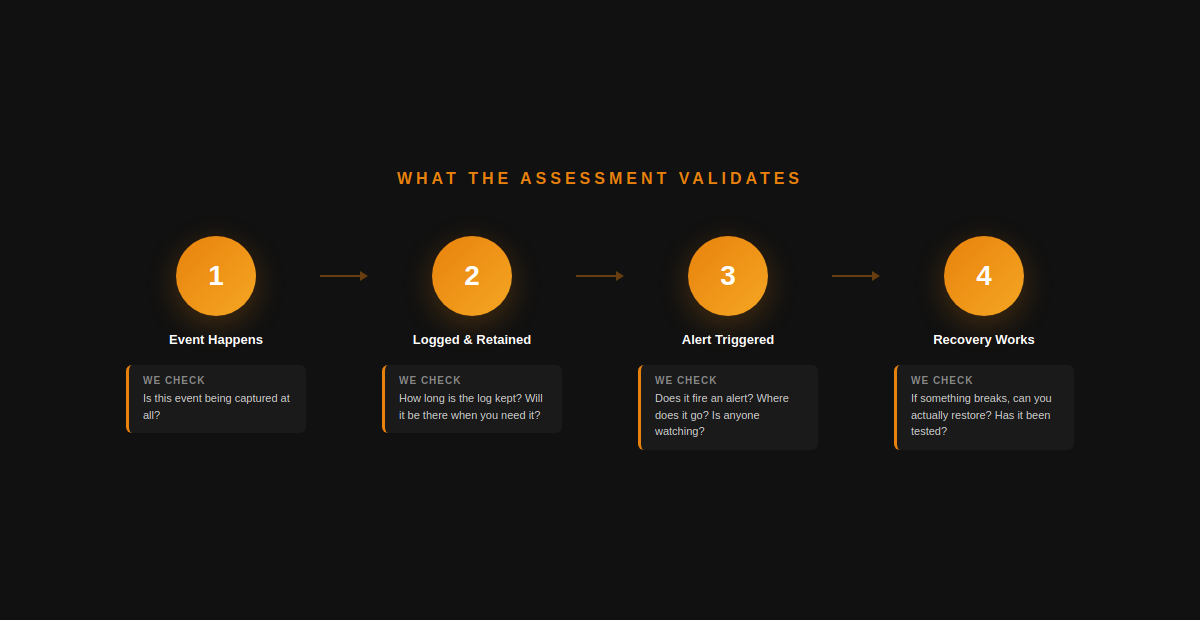
Most organizations have security tools deployed. Far fewer have clear visibility into what those tools are actually reporting — and this gap becomes critical once AI enters the picture.
An AI readiness assessment evaluates whether critical events are being logged, how long logs are retained, what triggers alerts, and where those alerts are routed. It also examines whether operational safeguards like backup and recovery processes have actually been validated — not just configured.
Common issues: alerts landing in inboxes no one monitors, logs rolling off before anyone reviews them, and backup jobs reporting success for months without a single confirmed restore. Once AI tools are operating across the environment, each of these gaps carries more weight — AI can interact with data at scale, and if something goes wrong, you need both the visibility to detect it and a verified recovery path to respond.
The enablement step: route alerts to monitored channels, extend log retention, validate backup restores, and add monitoring for AI-specific events — like unusual data access patterns or high-volume Copilot queries touching sensitive content.
5. AI Governance and Acceptable Use Policies
The final area of the AI readiness checklist addresses how your organization will govern AI usage going forward.
The assessment evaluates whether there is a defined AI acceptable use policy, whether roles and responsibilities around AI governance are assigned, and whether the organization has a plan for managing AI-related incidents.
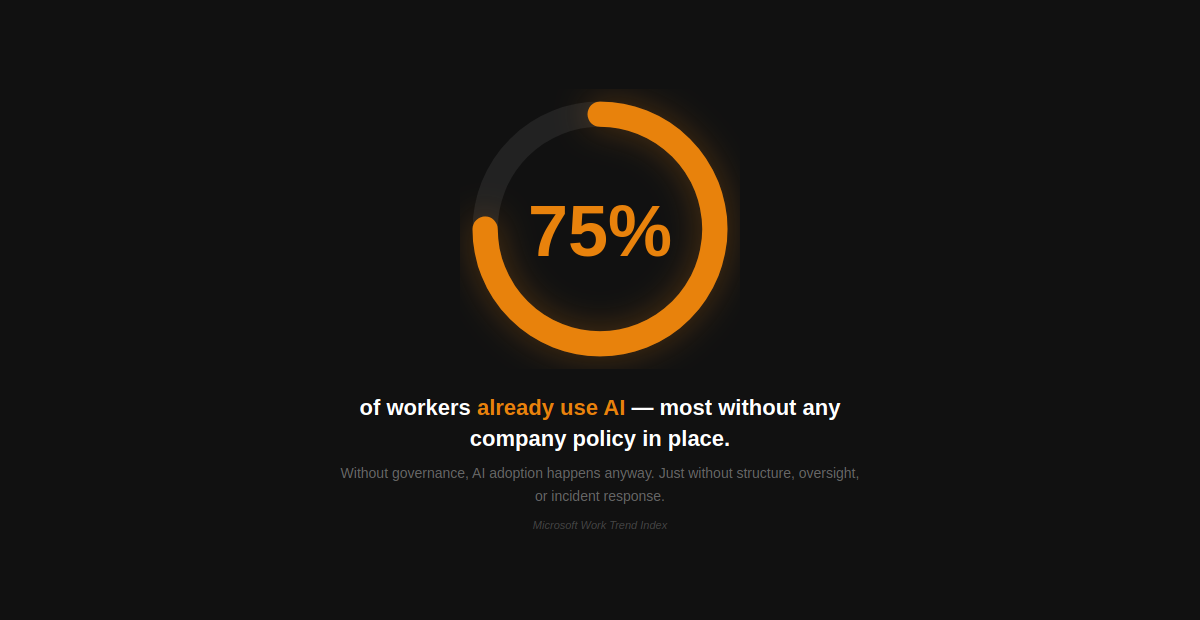
According to Microsoft’s Work Trend Index, 75% of knowledge workers now use AI at work, and many bring their own AI tools without organizational guidance. A 2025 BCG survey found that 45% of business leaders lack clear restrictions on AI use. Without governance, AI adoption happens anyway — just without structure or oversight.
The enablement step: create an AI acceptable use policy, define ownership for AI governance, establish incident response procedures for AI-related data exposure, and build a review cadence that evolves as AI tools and usage expand. Security awareness training should also be updated to include AI-specific guidance for employees.
AI Readiness & Enablement in Practice
A 60-person professional services firm in Austin engaged GCS Technologies to prepare for a Microsoft Copilot rollout. Rather than jumping straight to licensing and enablement, we started with an AI readiness assessment.
The assessment found:
- 14 dormant admin accounts from a prior IT provider — each with privileges Copilot would inherit
- MFA enforced for all users except three executives using legacy Outlook configurations
- Backup jobs running successfully for 11 months with zero confirmed restores
- No data classification or sensitivity labels applied across SharePoint and OneDrive
We remediated every finding before enablement. Dormant accounts were deactivated. MFA exceptions were resolved. Backups were tested and validated. Sensitivity labels and data classification policies were configured across Microsoft 365.
From there, we moved into enablement — rolling out Copilot to a pilot group, establishing an AI acceptable use policy with leadership, and integrating AI governance into the firm’s ongoing managed IT operations.
The result: AI adoption on a clean, governed, monitored foundation (instead of a rushed rollout on top of unresolved gaps).
When Should You Conduct an AI Readiness Assessment?
Before enabling AI tools like Copilot or ChatGPT Enterprise. The assessment ensures your data, access, and configurations are ready for what AI is about to do with them.
When onboarding a new MSP or IT provider. Inherited environments almost always contain undocumented risks and ungoverned data that AI tools would amplify.
Before a compliance review or cyber insurance renewal. Insurers increasingly ask about AI governance alongside traditional security controls. Assessment and enablement documentation strengthens your position.
After a security incident or near-miss. An assessment determines whether the event was isolated or a symptom of broader gaps — and whether AI adoption should wait until they are resolved.
When your environment has not been independently reviewed in 12+ months. Configurations drift, people leave, exceptions accumulate — creating conditions where AI would introduce risk rather than productivity.
How GCS gets your environment AI-ready
GCS Technologies helps Austin-area businesses move from AI readiness to AI enablement through a structured process:
- AI Readiness Assessment. We evaluate your data governance, access controls, security configurations, monitoring, and governance policies — identifying what needs to be addressed before AI goes live.
- Remediation & Preparation. We resolve findings from the assessment: cleaning up access, classifying data, enforcing security configurations, and establishing AI governance policies.
- Controlled AI Rollout. We enable AI tools for a defined pilot group, monitor adoption, and validate that governance and security controls are working as intended.
- Ongoing AI Governance. We integrate AI oversight into your managed IT operations — monitoring usage, reviewing access, updating policies, and ensuring AI continues to operate on a secure, governed foundation.
The goal is not just to assess readiness, but also to enable AI the right way and keep it running securely over time.
Get Started with an AI Readiness Assessment
GCS Technologies conducts AI readiness assessments and enablement for Austin-area businesses. Get a clear view of what needs to be in place — and a structured path to adoption.
FAQ: AI Readiness Assessment
What is an AI readiness assessment?
An AI readiness assessment is a structured evaluation of your organization’s data, access controls, security configurations, and governance policies to determine whether your environment is prepared for AI adoption.
What does an AI readiness assessment cover?
It evaluates five areas: data readiness and classification, access controls and privilege management, system and security configurations, logging and alert coverage, and AI governance policies.
What is AI enablement?
AI enablement is the process of preparing your environment and rolling out AI tools after a readiness assessment — including remediation, governance setup, controlled rollout, and ongoing management.
Why does security matter for AI readiness?
AI tools like Copilot inherit user permissions and pull from your environment. Overpermissioned accounts, unclassified data, and dormant accounts become active exposure surfaces once AI is enabled.
What is data readiness for AI?
Data readiness for AI means your data is organized, classified, properly permissioned, and governed — so AI tools access the right information without exposing sensitive content.
When should a business get an AI readiness assessment?
Before enabling AI tools, when onboarding a new IT provider, before a compliance or cyber insurance review, after a security incident, or when your environment has not been independently reviewed in over 12 months.